Have you ever wondered how to use Salesforce Einstein to derive meaningful insights from your unstructured data, such as images and text data? Explore this example to learn how to integrate Einstein Platform Services into your CRM workflows to build AI apps, fast.
We at Altimetrik have built a hypothetical app called, Who am I?, using Einstein Platform Services. Who am I? uses Einstein Vision’s image recognition technology, specifically Einstein Image Classification, to recognize and discern content based on images across several industries within the Fortune 500. Let’s get started to see how it works on a simple example!
Gather Training Data
To get started with Einstein Image Classification, you’ll first need to create a training dataset with defined labels. Each folder will contain sample images that correspond to your training labels. Once you’ve gathered your training data, you can save then save it as a .zip file and upload it to Dropbox before making an API call to the Einstein Vision API (cURL command).
The above command will return the newly created Dataset ID and Label IDs along with the Label Name and number of examples that correspond to each training label. The type parameter in the cURL command determines the model type and are as follows:
image image-detection (available in Einstein Vision API version 2.0 and later) image-multi-label (available in Einstein Vision API version 2.0 and later)
Train your Model
As mentioned, training your dataset requires making a simple API call. You can use the cURL command below (where “” is the ID returned from the dataset creation):
This command returns a prediction i.e. the probability that the new image falls within one of your defined labels.
And, because Who am I? is a mobile app, it’s optimized to make predictions from mobile images. The following is a sample callout for using data from mobile devices, as we know many customers, like us, prefer to build mobile first apps.
Now that you’ve trained your model, it’s time to see Einstein Image Classification in action.
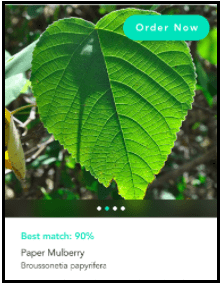
Using your mobile phone, capture any image such as a picture of a leaf in this example:
Einstein Image Classification will then return the prediction with a probability range as seen in the image. Looks like our app identified a mulberry leaf with 90% confidence!
After getting a basic app working, the next step is to embed Einstein Image Classification into your application workflows to create AI-powered apps for your business. If you want to learn more about how to integrate intelligence into your applications, make sure to attend the following sessions: Test Automation and Continuous Integration in SDLC Using Salesforce DX, by Oscar Quintela, 1:00 PM to 1:40 PM at Moscone West 2009 Codeless Advanced Lightning Components, by Fernanda Vecino and Rodrigo Juliani, 3:00 PM to 3:40 PM at Moscone West 2009 Smart Lookups with Machine Learning, by Juan Bessonart and Diego Latierro, 2:15 PM to 2:35 PM at Moscone West, Developer Theater
Chitra is an expert in development and deployment of cloud computing technologies and has managed global teams. She has led the deployment of cloud computing platforms for Fortune 100 companies in varied sectors – Pharmaceutical, Insurance, Automobile, Aviation, Telecom, to state a few.
She has experience in integrating IoT and cloud platform in the renewable energy sector. Chitra holds an M.S. in Computer Science from Ohio University, USA and B. Tech in Information Technology from the University of Madras, India.